Introduction
In today’s digital-first world, maintaining accurate and compliant Google Business Profiles is essential for Australian businesses that rely on local visibility. Your Google Business Profile (GBP) connects your brand to customers through Google Maps, local search results, and Google Search. When a GBP suspension occurs, it can cause an immediate drop in traffic, Google reviews, and lead flow. In this guide, we’ll outline how to manage appeal processes, submit evidence through the Google Business Profile appeals tool, and restore your Google listing while keeping your local SEO strong. Need professional help? Contact The Business Team — we specialise in GBP reinstatement for Australian businesses.
Understanding Google Business Profile Suspension
A Google Business Profile suspension happens when Google restricts or disables a business listing that violates its policies. This can occur from a policy violation, incomplete Business Documentation Evidence, or mismatched details between your business website, lease agreement, utility bills, and business registration. Once suspended, your listing will not appear in Google Maps or local search results, resulting in a significant loss of trust and online visibility.
Common Reasons for Suspension
- Duplicate or Bulk Listings – Having multiple or overlapping local profiles or API accounts for the same business address.
- Address Issues or Virtual Offices – Using a virtual office address or unverifiable Service Area Business (SAB) details.
- Keyword Stuffing – Including excessive keywords in your business name or Google listing (e.g. “Elegant Lock and Key Locksmith Sydney Emergency 24/7”).
- Policy Violations – Breaching Google Business Profile guidelines, Google My Business Guidelines, or Google Review Policy.
- Non-Compliance with Google Policy – Using prohibited content, spammy map edits, or algorithmic sweep triggers.
| Reason | Description |
|---|---|
| Duplicate Profiles | Multiple listings for one location, triggering a suspension. |
| Virtual Office | Non-physical or unverifiable office addresses. |
| Keyword Stuffing | Excessive use of search terms in your profile name. |
| Policy Violation | Breach of Google guidelines or Google Policy. |
Pre-Appeal Preparation
Before using the Google Business Profile appeals tool, it’s vital to collect proof of your business’s legitimacy and eligibility. This step strengthens your reinstatement request and ensures that your Google My Business Profile complies with official policies.
Checklist for Verifying Your Eligibility
- Profile Ownership and Google Account Access – Confirm you have admin rights to the Google Business Profile ID and associated email account.
- Suspension Notification Email – Locate and review the message for clues about the policy violation or account restriction.
- Review Google’s Guidelines – Cross-check Google Business Profile Support, Help Center, and Google Business Profile Community resources for clarity.
| Checklist Item | Purpose |
|---|---|
| Profile Ownership | Ensure admin control of your GBP. |
| Notification Email | Identify suspension cause. |
| Google Guidelines | Understand compliance expectations. |
Diagnostic Checklist for Identifying Triggers
- Search for duplicate Google listings or My GMB profile in Google Maps.
- Verify your NAP (Name, Address, Phone) matches your business registration.
- Ensure your business name is consistent with branding across your business website, Contact Us page, and Google Drive documents.
- Review any recent profile changes, content moderation, or edits.
- Confirm you have valid Business Bank Account, Business Insurance, lease agreement, water bill, or utility bills as proof.
- Gather your business licence, business license, and Tax certificates to verify legitimacy.
- Check Google My Business settings for any unauthorized users or API access.
Organizing Supporting Documents
- Photos – Capture signage, storefronts, and staff for the verification process.
- Documents – Include business license, Tax Certificate, official business registration, utility bills, and proof of operation.
- Online Consistency – Align your GBP data with your business website, social media, and Google My Business Profile.
Correcting Violations Before Appeal
Before submitting a reinstatement, fix all identified issues. A clean, compliant profile increases your reinstatement success rate.
How to Correct Violations
- Duplicate Profiles – Remove or merge duplicates using the Google tool or Manage Appeals Tool.
- Address Conflicts – Ensure your address matches your lease agreement and business documentation.
- Keyword Stuffing – Eliminate excessive keywords and spammy edits.
- Virtual Office Issues – Replace with a verified physical or Service Area Business address.
Example Corrections
- Consolidate multiple Google Business Profiles into one verified listing.
- Match your profile address with your official business registration.
- Remove promotional content like “Best in Sydney” or “Cheap Locksmith” from the name.
Step-by-Step Appeal Process
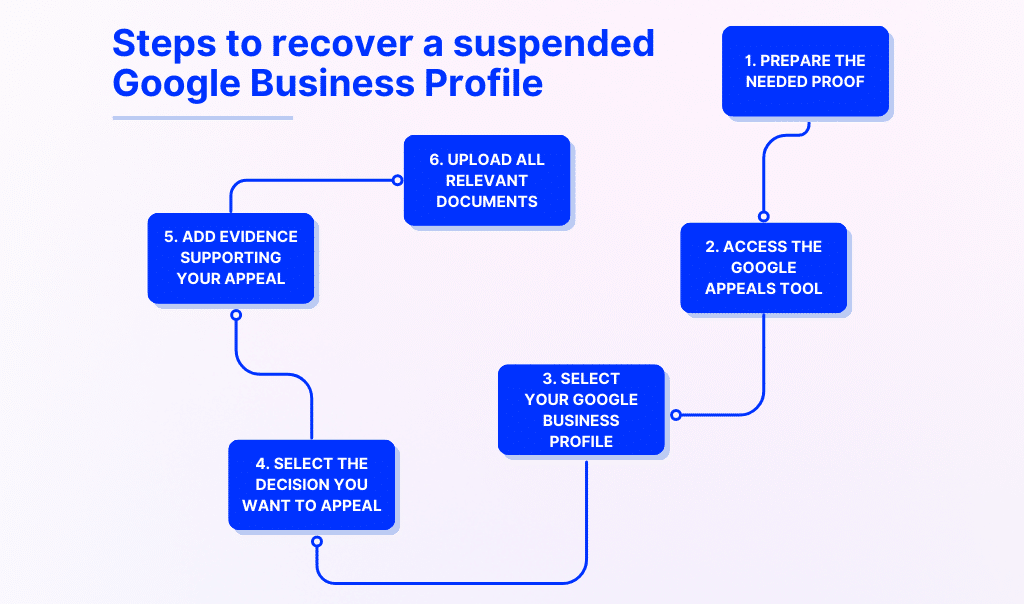
Once all corrections are complete, start your reinstatement process using the Google Business Profile appeals tool.
How to Appeal
- Access the Appeals Tool – Sign in to your Google account.
- Select the Suspended Profile – Identify the affected Profile ID.
- Review Reason for Moderation – Confirm the type of policy violation and view suspension/appeal history.
- Submit Appeal – Complete the evidence form and attach supporting documents such as business licence, Tax Certificate, and lease agreement.
- Track Status – Monitor updates via email account, progress bar, or assigned case ID.
| Step | Action |
|---|---|
| Access Appeals Tool | Log in to your Google account. |
| Select Suspended Profile | Identify the profile and Profile ID. |
| Review Reason | Understand why the listing was suspended. |
| Submit Appeal | Provide supporting documents and evidence. |
| Track Appeal Status | Follow the appeal resolution times via email. |
Expert Tip: Submit all documentation (like business registration, utility bills, and proof of operation) as one cohesive Business Documentation Evidence package. Only appeal when fully compliant.
After Submitting Your Appeal
What to Expect
- Email Updates – The Google support team will email updates on your case.
- Review Timelines – Expect appeal resolution times between 2–4 weeks, depending on the appeals backlog and Appeals queue.
- Further Requests – The Google Support or support team may ask for more evidence or a re-verification process.
- No Edits During Review – Avoid modifying your profile to prevent profile restriction.
| Stage | Duration |
|---|---|
| Initial Submission | Immediate |
| Review Period | 2–4 weeks |
| Follow-up Requests | As required |
If Your Appeal Is Denied
- Escalate Through Support Channels – Contact Google Business Profile Support or consult the Google Business Profile Help Community.
- Use the Community Forum – Engage with Product Experts and support forums for troubleshooting advice.
- Avoid Duplicate Appeals – Don’t resubmit until all policy violations are corrected.
- Get Professional Help – The Business Team offers GBP reinstatement services for Australian businesses. We handle the appeal process so you don’t have to.
Special Cases & Troubleshooting
- European Economic Area (EEA) – Businesses in the European Union or European Free Trade Association must follow region-specific rules.
- Ineligible Profiles – If your business can’t be appealed, contact Google Business Profile Support directly.
- Community Assistance – Ask for help in the Google Business Profile Community or from a Product Expert like Greg Gifford.
Section 7: Preventing Future Suspensions
Best Practices for Compliance
- Stay Updated – Review Google guidelines and Google Review Policy frequently.
- Ensure Accurate NAP – Keep your Name, Address, and Phone consistent across your listings. This is a core part of effective local SEO.
- Maintain Clean Access Control – Restrict Google My Business Profile access to trusted users only.
- Monitor Content Moderation – Regularly review user contributions and avoid spammy edits.
Conclusion
Appealing a Google Business Profile suspension requires diligence, clear documentation, and adherence to Google guidelines. Submitting a strong, well-prepared reinstatement form and maintaining compliance with Google My Business standards will help you regain your visibility in local search results. For professional assistance, The Business Team offers expert Google Business Profile reinstatement services, reputation management, and local SEO consulting to help Australian businesses stay compliant, visible, and growing. Get in touch today.
FAQs
1. Why was my Google Business Profile suspended?
Common causes include duplicate listings, keyword stuffing, virtual office misuse, or policy violations.
2. How long does the appeal process take?
Typically 2–4 weeks depending on the appeals queue, support team workload, and documentation completeness.
3. What if I disagree with Google’s decision?
You can escalate through Google Support, Google support page, or seek advice in the Google Business Profile Community.
4. How can I prevent future suspensions?
Maintain accurate details, follow the Google My Business Guidelines, and ensure your proof of operation is updated.
5. Why should I consolidate duplicate listings?
Duplicate business listings create confusion, lower local SEO performance, and risk GBP suspension. Always maintain a single verified profile.