Introduction
In the dynamic world of digital marketing, the Google Ads platform has become an indispensable tool for Australian small and medium-sized businesses looking to boost visibility, attract qualified leads, and drive growth. Whether you’re launching your first Google Ads Campaign or managing complex ad campaigns across multiple channels, understanding how Google Ads credits and promotional offers work can save significant money while improving your advertising performance.
From promotional credit and ad credit to billing adjustments and refunds, this guide explains everything Australian business owners need to know about how Google Ads credits function. You’ll also learn how to use Google Ads support, Billing Summary tools, and Google Ads dashboards to monitor credit usage and optimise results.
What Is a Google Ads Credit?
A Google Ads credit is a promotional or compensatory balance applied to your Google Ads account. It helps offset your advertising expenses and enables you to run campaigns more effectively. These credits can come from promotional offers, system corrections, or courtesy adjustments issued by Google Ads support channels.
Common forms of ad credits include:
- Promotional Credit: Offered through Google Ads Promo Codes or Google Ads Credit Coupons for new advertisers. For example, the popular “Spend $500 USD, get $500 USD in ad credit” offer helps new businesses kickstart their campaigns.
- Invalid Activity Credit: Automatically issued when Google detects fraudulent or invalid clicks that inflate costs.
- Technical or Overdelivery Credit: Provided when ads exceed daily budget limits or encounter a system error.
These credits can be used across Search ads, Display ads, Video Campaigns, Shopping Campaigns, and App Campaigns, making them a flexible funding tool for any online marketing strategy.
Types of Google Ads Credits
| Credit Type | Trigger/Reason | Applied By | Refundable? | Expiration |
|---|---|---|---|---|
| Promotional/Courtesy Credit | Promo codes, vouchers, or special promotional offers | Automated/manual | No | 60 days typical |
| Invalid Activity Credit | Fraudulent or bot-generated ad impressions and clicks | Automated review | No | N/A |
| Overdelivery Credit | Costs exceeding your Google Ads Budget | Automated review | No | N/A |
| Overrun Credit (manual pay) | Ad spend exceeds prepaid balance | Automated/manual | No | N/A |
| Excess Credit | Credits from technical issues or billing discrepancies | Automated/manual | Yes (post-termination) | N/A |
| Technical Issue Credit | Google system or tracking errors | Manual review | No | N/A |
How to Qualify for Google Ads Credits
Promotional Credits
These are generally available through Google Ads Promotional Credit campaigns, Google partner programs, or authorised Google Ads Agencies. To qualify, you may need to:
- Create a new Google Ads account.
- Spend a specified credit amount within a defined time (e.g., “Spend $500 USD to receive $500 in ad credit”).
- Comply with Google Ads Policies and have your ad copy approved.
Linking your Google Business Profile and setting up a Google Ads business page can also increase eligibility for active promotions and community content rewards.
Manual and Automatic Credits
Credits issued for invalid clicks, billing errors, or system faults are typically added automatically. In some cases, you can request assistance through Google Ads Support or reference the Google Ads Support Documentation to initiate a review.
How to Check and Apply Google Ads Credits
Google makes it simple to track and use your ad credit through the Billing section of your Google Ads Manager.
Step-by-step instructions:
- Log in to your Google Ads account.
- Click on the Billing icon in the left sidebar.
- Navigate to Billing Summary or Promotions.
- Review active promotions, remaining credit balances, and expiration dates.
- Ensure that your payment settings are correct and that credits apply to your next billing cycle.
The Google Ads dashboard and Analytics tools also provide transparency into your advertising spend, campaign results, and ROI. Using conversion tracking and page tracking through Google Tag Manager further enhances your ability to optimise campaigns.
Rules, Limitations, and Expiration
Every Google Ads Promotional Credit comes with specific conditions. Typically:
- Promotional credits expire 60 days from the Google Ads expiration date shown in your Billing Summary.
- Credits cannot be refunded or exchanged for cash.
- They apply only to future advertising funding and cannot cover past charges.
- Google Ads Policies prohibit transferring promotional credits between accounts.
To avoid losing value, schedule Display Campaigns or Search ads strategically within your credit window.
Overspending Beyond Credit Limits
If your advertising spend exceeds your available credit amount, the remaining cost will be billed to your default payment method. Prevent overspending by:
- Regularly reviewing your Google Ads billing details.
- Setting daily budget limits aligned with your available credits.
- Pausing underperforming ad campaigns through the Google Ads dashboard.
Adjustments and Credit Scenarios
Invalid Clicks and Impressions
Google automatically detects invalid activity using machine learning. If ad impressions or clicks appear fraudulent, you’ll receive an Invalid Activity Credit directly to your Google Ads account.
Technical or System Errors
For issues caused by platform glitches or downtime, Google may issue a Technical Credit or Overdelivery Credit. To monitor such issues, leverage tools like Google Tag Manager and Google Ads Analytics for consistent page tracking and conversion tracking.
Managing Payment Settings and Credits
Your payment setup dictates how credits are applied:
- Automatic Payments: Credits reduce future invoices automatically.
- Manual Payments: Credits deduct from your prepaid balance.
- Monthly Invoicing: Credits appear on your next billing statement.
Ensure your payment settings are up to date in the Billing section. For large or multi-campaign advertisers, consider using Google Ads Manager to centralise budgeting and credit allocation.
Frequently Asked Questions
1. Who is eligible for Google Ads credits?
Eligibility depends on whether you’re a new advertiser, part of a Google partner program, or qualifying for technical credits.
2. How soon can I use my credit?
Most credits apply immediately once your Promotional Code is validated.
3. Can I combine multiple credits?
Yes, but each has its own expiration date and rules.
4. Is my credit refundable?
Only Excess Credits are potentially refundable upon account closure.
5. What happens if I exceed my budget?
Your payment method will cover the difference once your Google Ads credit runs out.
Troubleshooting Missing or Inactive Credits
If your ad credit doesn’t appear:
- Verify eligibility and spend requirements.
- Check for expired credits in the Promotions tab.
- Contact Google support via Google Ads support channels for resolution.
- Review Google Ads support documentation for instructions on disputing billing errors.
Best Practices to Maximise Google Ads Credits
- Monitor your Billing Summary and track every credit amount.
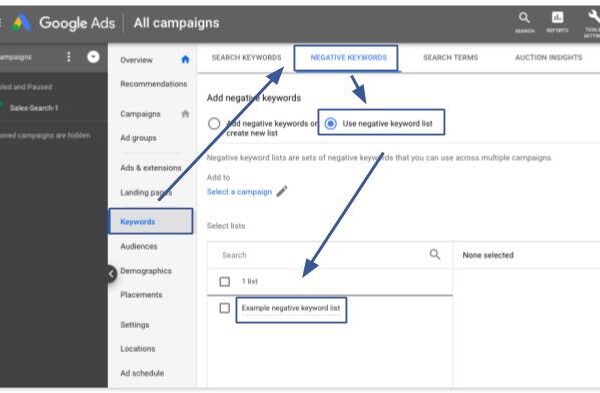
- Use negative keywords to filter irrelevant search results pages.
- Optimise ad copy and landing pages for higher conversions.
- Apply Maximize Clicks or Maximize Conversions bidding strategies.
- Leverage responsive search ads to improve click-through rates.
- Work with certified campaign strategists through the Google partner network or a trusted marketing firm.
- Study insights from programs like Futurpreneur Canada or the Business Development Bank of Canada if you operate internationally.
Conclusion
Mastering how Google Ads credits work can make a powerful difference in your advertising success. By understanding the types of credits, monitoring your Google Ads billing, and aligning with Google Ads Optimization strategies, you can significantly improve Google Ads ROI and stretch your advertising spend further.
If you want to elevate your performance, work with a Google Ads Agency or Google Ads Certified professional who understands both the technical and strategic sides of the Google Ads platform. Together, you can create data-driven Google Ads Campaigns that grow your brand, improve conversions, and deliver measurable results for your business.